


Google’s Find Hub
4.239.68K Reviews
App Specs
- Version
- Varies with Device
- Updated On
- License
- Free
- Downloads
- 1,000,000,000+
- Developer
- Google LLC
- Categories
- Tools
- Platform
- Android, iOS
Screenshots
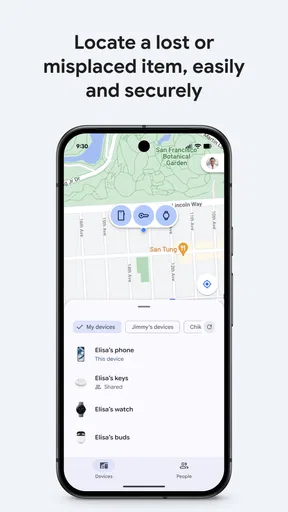
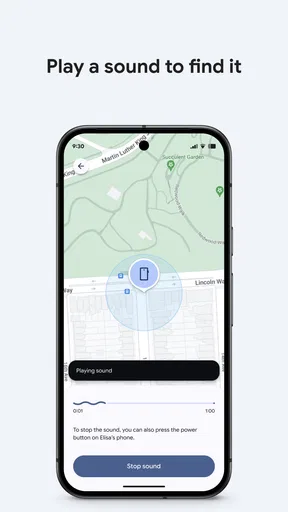
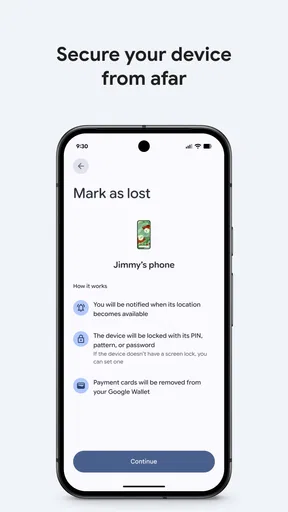
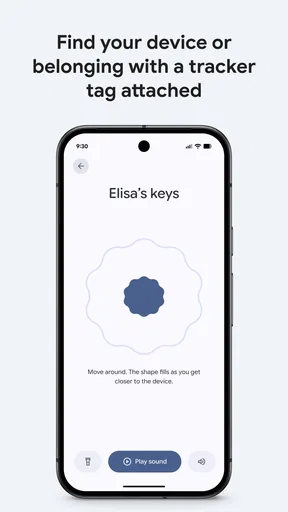
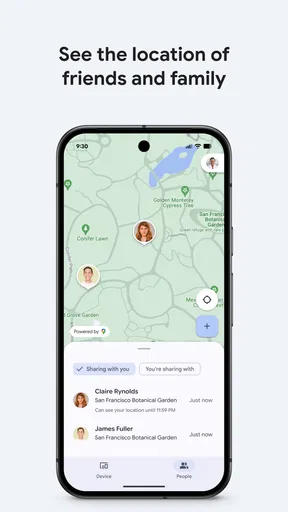
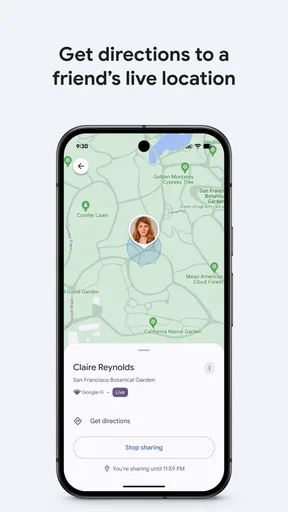
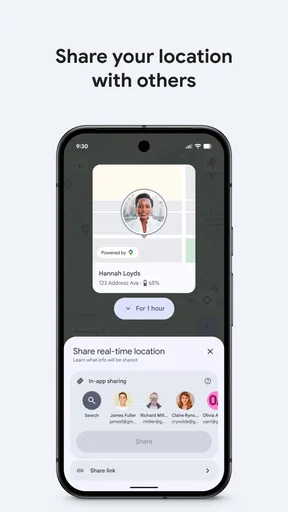
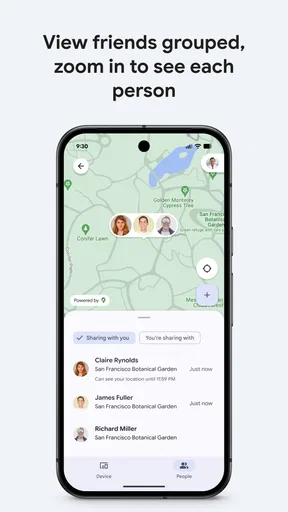
 Analysis by AppCompare
I judge a lost-item tool by what it helps me do in the few minutes after I notice something is missing. Google’s Find Hub is built around that moment: it gives me a place to look for devices and other items, and to share location with people I trust. That can turn a frantic search into a more deliberate check, though it works best when I set it up before anything goes missing.
A practical home for finding and sharing
Find Hub is a free tools app from Google LLC, and its central appeal is straightforward: it brings locating and location sharing into one place. I find that combination more useful than treating the app as an emergency button alone. When I have a device nearby, I can try a direct search; when I am coordinating with someone, shared location can help answer a different question, such as whether they are on their way.
The distinction matters. A phone lost somewhere in the house is a different problem from a device left behind during a busy day, and neither is quite the same as checking in with family. The app gives me a familiar starting point for these situations, but it cannot make every item equally easy to find. The result depends on what I am looking for and whether the relevant device or item can be located at that moment.
Guides and Analysis on Google’s Find Hub
Set it up before the stressful moment
My most useful advice is to open the app while everything is still accounted for. Take a moment to see which devices and items are available to you, and become familiar with the controls. That small bit of preparation can prevent a rushed search from turning into a second problem: trying to learn the interface while also retracing your steps.
I would also decide in advance how location sharing fits into your routine. Sharing can be convenient for a family coordinating a pickup or friends trying to meet in a busy place, but it is best treated as a deliberate choice rather than something to enable casually. Talk through who needs access and when it is useful. A location tool should make coordination easier, not become a substitute for a conversation about boundaries.
What a real search looks like
Picture leaving home for work and realizing, halfway down the street, that your phone is not in your pocket. I would first check the app for the device’s location, then use the result to decide whether to retrace my route or search the last place I remember setting it down. If I suspect it is close by, a sound can be more helpful than staring at a map. If the location points somewhere I cannot reach immediately, I can avoid wasting time searching the wrong room or building.
That is the practical strength of Find Hub: it helps me choose the next sensible action. Location information is a clue, not a guarantee that an item is exactly where a marker appears. Indoors, in a crowded place, or after a device has moved, I would use the information as a starting point and check the surroundings rather than assume the map tells the whole story.
Worth Reading Before You Choose

Basketball Stars: Multiplayer Is Fast, but Can It Recover When Matches Go Wrong?

WEBTOON Turns Phone Updates Into a Better Reading Routine

Link to Windows Runs on Shared Habits, Not Social Feeds

How Alibaba.com Dominates the B2B Marketplace

Metro's Quiet Rise: Redefining Mobile Communication

Harnessing Ecosystem Power with Phone Tracker by Number
Using Find Hub in Everyday Life
I find the most useful way to think about Find Hub is as a starting point for deciding what to do next, rather than a promise that a missing item will turn up. In this section, I focus on how that distinction changes an ordinary search and why a little preparation can make the app easier to use when time is tight.
Getting Started: The Setup
Setting up the app was a breeze. I downloaded it from the store, and within minutes, I was up and running. The user interface is super intuitive, which is a huge plus. I didn’t have to spend ages figuring out how to navigate it. Just a few taps, and I was good to go. You can link multiple devices, which is awesome if you’re like me and have a ton of gadgets lying around.
Features That Stand Out
One of the coolest features is the ability to ring your devices. Lost your phone in the couch cushions? No problem! Just hit the ring button, and voilà, your phone starts singing. It’s like magic. Plus, the app integrates seamlessly with Google Assistant, so you can use voice commands to locate your stuff. I mean, how cool is that?
Another feature I love is the location history. It’s like having a timeline of where your device has been. This can be a lifesaver if you’ve genuinely misplaced something and need to backtrack your steps. The accuracy is spot on, too, which is reassuring.
Privacy and Security
Now, I know what you’re thinking—what about privacy? Well, Google has done a solid job here. They’ve implemented some strong security measures to ensure your data is safe. Everything is encrypted, and you have control over what’s shared. It’s nice to know that your location data isn’t just floating around out there.
Location sharing also brings a practical responsibility: I would keep it focused on people and situations where knowing one another’s whereabouts genuinely helps. If you are setting it up for a household, agree on its purpose first. That makes it easier to use the feature comfortably and to revisit the arrangement if people’s routines change.
Everyday Use: My Experience
I’ve been using Find Hub for a couple of weeks now, and honestly, I wonder how I ever lived without it. It’s not just practical; it’s also super reliable. I’ve tested it in different scenarios—finding my phone at home, checking the last known location of my tablet, you name it. Each time, it worked flawlessly.
Plus, it doesn’t drain your battery, which was a major concern for me initially. The app runs efficiently in the background without hogging resources. It’s like having a personal assistant who’s always ready to help.
Where it fits among alternatives
Compared with relying on memory, calling your own phone, or asking someone else to check a room, a dedicated finder gives you a more organized first step. Find Hub is particularly appealing if you already use Google services and want device locating and location sharing together rather than juggling separate tools. For a quick search at home, ringing the device can be simpler than interpreting a map; for coordinating with another person, sharing location addresses a need that a basic alarm cannot.
That does not make it the right choice for every search. If you mainly need a tracker designed around a particular brand’s products, that brand’s own finding tool may suit your setup better. And if your problem is simply forgetting where you put everyday belongings, a consistent routine—one place for keys, one place for a bag—may prevent more lost-item searches than any app. I see Find Hub as a useful layer, not a replacement for good habits or a promise that every missing object can be recovered.
Who will get the most from it
I would recommend it most to people who regularly misplace a phone or tablet, keep several devices in circulation, or want a straightforward way to coordinate location with family or friends. The app is also a sensible choice for someone who would rather prepare a basic recovery routine now than improvise under pressure later. It is free, rated for Everyone, and its broad adoption—over a billion installs alongside an average rating of 4.2 from around 1.6 million ratings—suggests it has become a familiar option for many users.
On the other hand, I would skip it if you do not want location features on your phone, have no interest in sharing your whereabouts, or expect a finder to locate any object regardless of what it is. It is a tools app, not a substitute for securing valuables or contacting the appropriate people when a device is truly missing. A useful first check is not the same thing as a guaranteed recovery plan.
Small habits that make searches easier
There are a few ways I would make the app more useful without turning it into a daily chore. First, learn the difference between checking a device’s location and asking it to make a sound; they solve different problems, and the sound is most helpful when I already have reason to think the device is nearby. Second, when I am trying to retrace a route, I would compare the location clue with the last place I personally remember using the device instead of treating either one as definitive.
For a household, I would keep the arrangement simple: make sure each person knows which devices they are responsible for, and use shared location for a clear coordination need, such as meeting after separate errands. That avoids the common mistake of enabling a feature without agreeing on what it is for. If someone only needs to say they have arrived, a quick message may be more appropriate than ongoing location visibility.
Questions worth considering before relying on it
Can it help with a device that is not in the same room? It can give you a location clue to guide your next step, while a ring is most useful when the device is close enough for you to hear. Should I trust the displayed location completely? I would not: use it to narrow the search, then verify the surroundings. Is it only useful for your own device? Location sharing makes it relevant to trusted friends and family too, although that feature works best when everyone understands the arrangement.
Another reasonable question is whether it replaces a careful response to a missing device. I would treat it as the first place to check, not the whole plan. If the item appears to be somewhere you cannot access, avoid confronting anyone or entering a private place based on a location clue alone. Use common sense and appropriate help. That is a more realistic way to benefit from a finder than expecting an app to resolve every situation by itself.
Wrapping It Up: Final Thoughts
So, in a nutshell, Google’s Find Hub is a must-have app. Whether you’re prone to losing things or just want an extra layer of security for your devices, it’s totally worth it. The peace of mind it offers is priceless. From its easy setup to its robust feature set, it ticks all the boxes. If you haven’t tried it yet, do yourself a favor and check it out. It might just become your new favorite app.
My enthusiasm comes with one qualification: the app is most valuable when its role is clear. I would use it to narrow down a search, ring a nearby device, or coordinate with people I trust—not as a guarantee that every item can be found. With that expectation, it is a practical free tool from Google LLC that can earn its place on a phone. Its 39,000 reviews and Everyone content rating add context for people browsing the app, but the better test is whether locating devices and sharing whereabouts actually fits your day-to-day needs.
Pros
- User-friendly interface for easy navigation.
- Real-time location tracking feature.
- Seamless integration with Google services.
- Customizable alerts for specific locations.
- Battery-efficient performance.
Cons
- Limited offline functionality.
- Requires constant internet connection.
- Occasional lag in location updates.
- Privacy concerns with data sharing.
- Not compatible with older devices.
FAQs for Google’s Find Hub
What is Google’s Find Hub and what does it do?
Google’s Find Hub is an application designed to help users locate their lost or misplaced devices. It uses location services and integrates with other Google apps to provide real-time tracking. The app also allows users to ring their device, lock it, or erase data remotely to protect personal information.
Is Google’s Find Hub free to use?
Yes, Google’s Find Hub is free to download and use. However, it requires an active internet connection and location services enabled on your device. Some features may also require a Google account for full functionality, but there are no hidden charges for using the app itself.
Which devices are compatible with Google’s Find Hub?
Google’s Find Hub is compatible with both Android and iOS devices. For Android users, it typically requires Android 4.1 and up, while iOS users need iOS 11.0 or later. The app supports a wide range of smartphones and tablets, making it versatile for different users.
How accurate is the location tracking in Google’s Find Hub?
The accuracy of location tracking in Google’s Find Hub depends on several factors, such as the device’s GPS capabilities, network connection, and location settings. Generally, it provides a fairly precise location, but indoor environments or areas with poor GPS signal can affect accuracy.
What privacy measures does Google’s Find Hub have in place?
Google’s Find Hub prioritizes user privacy by allowing users to control what data is shared. It requires user consent to access location services and provides options to manage privacy settings. Users can remotely lock their device to prevent unauthorized access, adding an extra layer of security.


